
Description
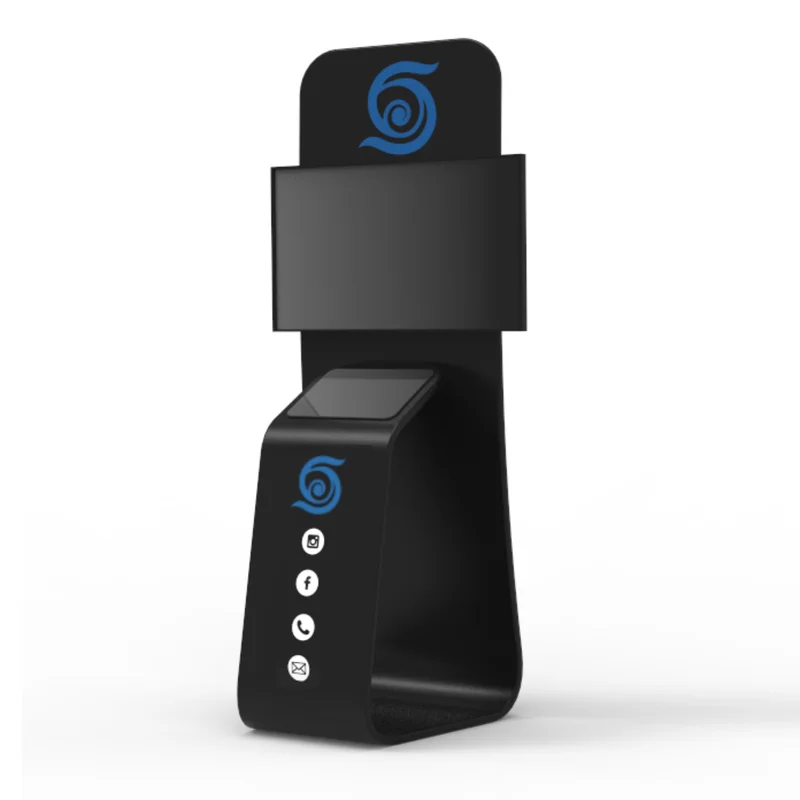
SpinPix360 Portable TV and iPad Stand Combo With Custom Logo Print
Features
- Perfect for displaying your Sharing Station while mirroring it on a TV
- Custom logo and color background printed on stretch fabric
- Lightweight aluminum frame
- Easy assembly and disassembly
- Carrying bag included
- TV and iPad mount included
- Recommended TV size: 46″ or smaller
- 36″W x 90″H
- Weight: 35 lbs
What Our Experts Think
- Versatile & Portable – Ideal for events, trade shows, and presentations, offering easy transport and setup.
- Custom Branding – Features a custom logo print to enhance brand visibility and professionalism.
- Adjustable & Secure – Supports both TVs and iPads, with adjustable height and a stable base for various display needs.
- 360° Rotation – Smooth spinning functionality for interdraft and dynamic presentations.
- Durable & Sleek Design – High-quality materials ensure longevity while maintaining a modern, professional look.
- Great for Marketing – Perfect for businesses, exhibitors, and content creators looking to make an impact.
Q&A
Q: What is the SpinPix360 Portable TV and iPad Stand Combo?
A: It is a versatile stand designed to hold both a TV and an iPad, making it ideal for events, trade shows, and business presentations. It also features a custom logo print for branding.
Q: What size TV and iPad does this stand support?
A: The stand accommodates various TV sizes (typically up to 55″) and securely holds an iPad, ensuring stability during use.
Q: Is the stand portable and easy to set up?
A: Yes, it features a lightweight, collapsible design for easy transport and quick assembly without the need for special tools.
Q: Can I customize the stand with my logo?
A: Yes, you can add your company’s branding or custom artwork to enhance visibility at events.
Q: What events is this stand best suited for?
A: It’s perfect for trade shows, conventions, product demos, retail displays, and any interdraft presentations requiring a TV and iPad setup.
Q: Is the stand adjustable?
A: Yes, the height and mounting positions can be adjusted to suit different viewing angles and setups.
Maintenance Tips
- Regular Cleaning: Wipe the stand with a soft cloth and mild cleaner to remove dust and fingerprints. Avoid harsh chemicals that may damage the finish.
- Screen Care: Use a microfiber cloth to clean the TV and iPad screens. Avoid excessive pressure to prevent scratches.
- Cable Management: Keep cables organized and untangled to prevent wear and tear. Use cable ties if necessary.
- Secure Setup: Ensure all bolts, screws, and mounts are tightened before each use to prevent wobbling or instability.
- Proper Storage: Store in a dry, cool place when not in use. Use a protective cover to prevent scratches and dust buildup.
- Transport With Care: If moving frequently, use padded cases or protective wrapping to prevent damage during transport.


Reviews
There are no reviews yet.